
Download Sn0wbreeze 2.8b1 – Jailbreak iOS 5 Beta 1
Tuesday, June 14, 2011
Sn0wbreeze 2.8b1 – iH8sn0w has finally updated sn0wbreeze. Sn0wbreeze 2.8b1 is now available for download and will jailbreak iOS 5 beta 1 tethered on iPhone, iPad and iPod touch.
Sn0wbreeze 2.8b1
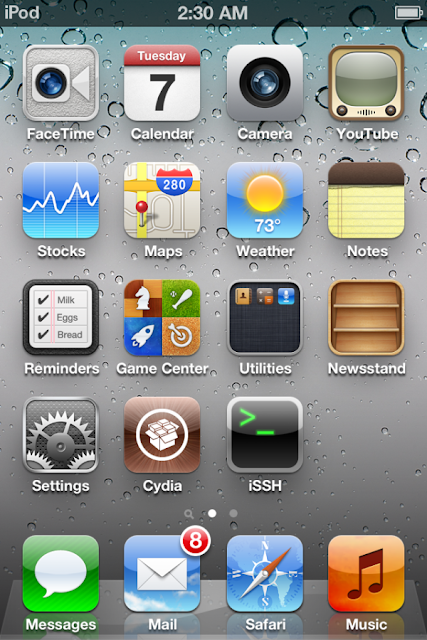
sn0wbreeze 2.8b1 Release Notes:
————————————–- Supports iOS 5.0 BETA 1 (9A5220p)
- Supports the following Devices:
- iPhone 3GS
- iPhone 4 [GSM]
- iPhone 4 [CDMA]
- iPod Touch 3G
- iPod Touch 4
- iPad 1G
- Props to @MuscleNerd for the kernel patches.

- THIS IS INTENDED FOR DEVELOPERS ONLY!!!
- This sn0wbreeze does NOT add afc2 or Hacktivate to prevent users from removing the UDID check after jailbreak.
- UNLOCKERS SHOULD STAY AWAY!!!
- This is a TETHERED jailbreak via iBooty.
iH8sn0w
Please keep in mind that iOS 5 beta 1 jailbreak is tethered as of now and will require you to connect your jailbroken device to the computer every time you boot it up. You can also jailbreak iOS 5 beta 1 tethered using our guide on redsn0w 0.9.8b1 for Mac and redsn0w 0.9.8b1 for Windows.
Download Sn0wbreeze 2.8b1 for Windows
Download iOS 5.0 beta 1 for developers – For Non-developers .
Download iTunes 10.5 for developers – For non-developers (Google it)
Stay Updated with iOS 5 Jailbreak with Sn0wbreeze 2.8b1 for tethered jailbreak until Untethered jailbreak release
How to Jailbreak iOS 5 – Redsn0w – iPhone / iPod / iPad
Tuesday, June 14, 2011
How to Jailbreak iOS 5 Redsn0w for iphone – ipod – ipad - Dev-team has released Redsn0w 0.9.8b1 to jailbreak iOS 5 beta 1, here’s the full step by step guide that shows you how to jailbreak iOS 5 beta 1 on iOS devices.
How to Jailbreak iOS 5 Redsn0w
How to Jailbreak iOS 5 Redsn0w – Supported Devices :
- iPod touch 3G
- iPod touch 4G
- iPad 1
- iPhone3GS
- iPhone4 (GSM)
- iPhone4 (CDMA)
Required Downloads:
- Download Redsn0w 0.9.8b1 for Mac
- Download iOS 5.0 beta 1 for developers – For Non-developers .
- Download iTunes 10.5 for developers – For non-developers (Google it)
How to jailbreak iOS 5 – iPhone 4, 3GS, iPod touch 4G, 3G and iPad 1
Step 1: Restore to iOS 5.0 beta 1Step 2: Start Redsn0w and point it to iOS 5.0 beta1 firmware ipsw file.
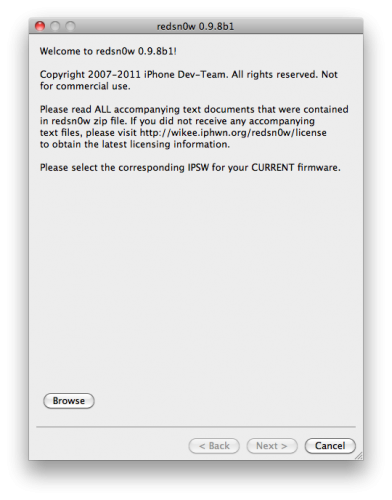
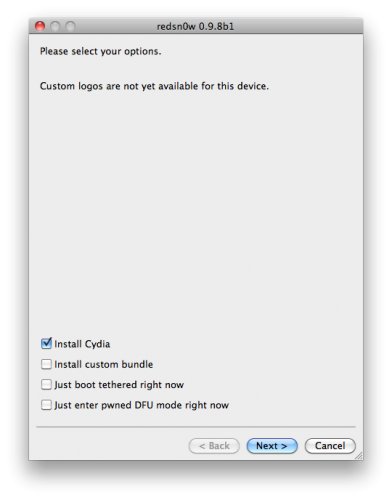
Step 3: Now select “Install Cydia” and click “Next”. Optionally (if available), you can also select any other option you like.
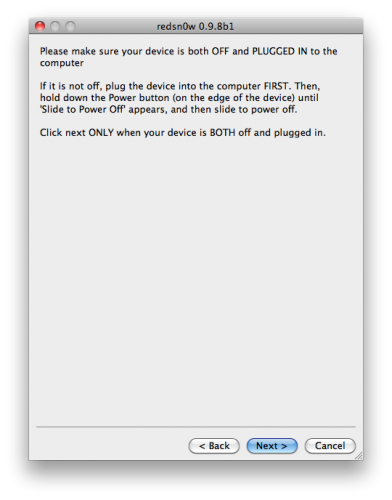
Step 4: Now make sure your device is both OFF and PLUGGED IN to the computer before you click “Next”.
At this stage you will be presented with a screen where you will be guided on how to enter DFU mode. Quickly hold “Power” button and then while holding the “Power” button, you will now have to hold “Home” button too. Now after few seconds release “Power” button but keep holding “Home” button until installation begins.
Step 5: Wait until you get iOS 5.0 beta 1 jailbroken in few minutes. Congratulations.
Tethered Jailbreak : Once current Redsn0w jailbreak is still tethered jailbreak, you will be required to connect your iOS device with your computer and run Redsn0w again then choose “Just boot tethered right now”.
Stay Updated with How to Jailbreak iOS 5 Redsn0w Updated for Untethered Jailbreak
How to jailbreak iOS 5 Windows Redsn0w 0.9.8 b1
Tuesday, June 14, 2011
How to jailbreak iOS 5 Windows Redsn0w 0.9.8 b1 ? Well, MucleNerd of iPhone dev-team has just released redsn0w 0.9.8b1 for Windows to jailbreak iOS 5 beta 1 for iPhone 4, 3GS, iPod touch 4G, 3G and iPad 1.
How to Jailbreak iOS 5 windows Redsn0w – Supported Devices :
- iPod touch 3G
- iPod touch 4G
- iPad 1
- iPhone3GS
- iPhone4 (GSM)
- iPhone4 (CDMA)
How to jailbreak iOS 5 Windows Redsn0w Downloads :
Download Redsn0w 0.9.8 b1 for Windows.Download iOS 5.0 beta 1 for developers – For Non-developers .
Download iTunes 10.5 for developers – For non-developers (Google it)
Stay Updated with How to jailbreak iOS 5 Windows Redsn0w and if you want to see Redsn0w Mac Guide from here
iOS 5 Jailbroken – iPhone 4, 3GS / iPod Touch 4G, 3G / iPad – Photos
Wednesday, June 08, 2011
iOS 5 Jailbroken As I told you earlier that jailbreak iOS 5 is possible, now MuscleNerd of iPhone dev-team confirms that iOS 5 jailbroken successfully ported to iPod touch 4G but it still tethered boot so far which means that you should connect to your computer on every reboot. Thanks dev-team.
iOS 5 Jailbroken


iOS 5 Jailbroken Successfully
iOS 5 Jailbroken For who don’t know, Apple has announced iOS 5 yesterday in the WWDC 2011, if you want to know what’s new on iOS 5 – Click Here, also you have to see the official iOS5 video. You have to know that iOS 5 is still available in beta version which only for developers, but don’t worry you can download iOS 5 from direct links From Here.Stay Updated with iOS 5 Jailbroken news
Incoming search terms:
- ios5 3gs
- iphone 4 ios 5
- 3GS ios5
- ipod touch 4 ios 5
- jailbreak ios 5 iphone 4
- ios 5 iphone 4
- ios5 3g
- ios5 baseband 3gs
- baseband ios 5 3gs
- porting ios 5 on iphone 4
- ios 5 jailbreak 3gs
- iphone 4g ios 5
- ios5 for 3gs
- jailbreak iphone 4 ios5
- ios 5 for iphone 3g?
- IOS 5 FOR IPHONE 4G
- iphone 3gs ios5 baseband
- Iphone4 iOS 5
- iphone4 ios5
- iphone 4 IOS5 baseband
iOS 5 Promo Video
Wednesday, June 08, 2011
iOS 5 Promo Video – Most of us are waiting eagerly for final iOS 5 release to try the new amazing features ourselves. Few hours ago we showed you what’s new on iOS 5, but if you have confused while imagining the new features, you can see the below awesome video that shows you what iOS 5 can do. Enjoy the video after the jump.
iOS 5 Promo Video

.png "English")


